How employee privacy can help protect businesses from ransomware
This post has been modified to reflect new information since its original publication.
The number of ransomware attacks has exploded in recent years, costing businesses hundreds of thousands and even millions of dollars. More importantly, 70% of these attacks involve small and medium-sized organizations, which proves that the threat isn’t relegated to big companies with their equally big pockets. Every business is a potential target.
This high-risk environment might lead you to believe it’s only a matter of time before your company experiences an attack. However, there are things you can do to reduce your odds of becoming a victim, and one of the main reasons so many companies fall victim to ransomware attacks is that they don’t pay attention to their employees’ online privacy.
The connection between online privacy and ransomware
Ransomware gangs tend to target individuals who have a lot of personal information online. This is because most ransomware attacks begin with phishing emails, which rely upon a thorough knowledge of their victims to manipulate the recipient into performing an unsafe act (like clicking a link or downloading a file) that installs ransomware on the person’s device.
To research their targets, bad actors can easily search LinkedIn for a particular company and keywords like “IT,” “finance,” or “vice president,” to find the names of decision makers or others who have high-level access to the organization’s systems. Once someone has a list of potential targets, that person can simply Google each name to view an individual’s social media activity, contact information, and anything others have posted about them.
Thanks to the proliferation of people-search sites and other data brokers that make money selling people’s personal details on the web, it doesn’t take much effort to uncover all kinds of valuable information, like someone’s:
Has your personal information been exposed online?
- Full name
- Birthdate
- Physical addresses
- Phone numbers
- Email addresses
- Job title
- Family members’ names
- Hobbies
- Pets’ names
- Financial information
- Court records
- Real estate transactions
- Political affiliations
And it doesn’t take much more effort to find even more intimate details, like where they like to shop, what charities they donate to, or the names of their coworkers.
The more data bad actors can find about an employee, the higher the risk of that person being targeted, and the more likely it is that a social engineering attack will succeed.
For example, if employees reveal they have an American Express card in a Facebook conversation, a cybercriminal might use that information to trick them into clicking on a link in an email that looks like it came from American Express. Often, these messages convey a sense of urgency, stating that there is a problem with the recipient’s account and that the individual needs to click on a link to verify a transaction or prevent the account from being closed.
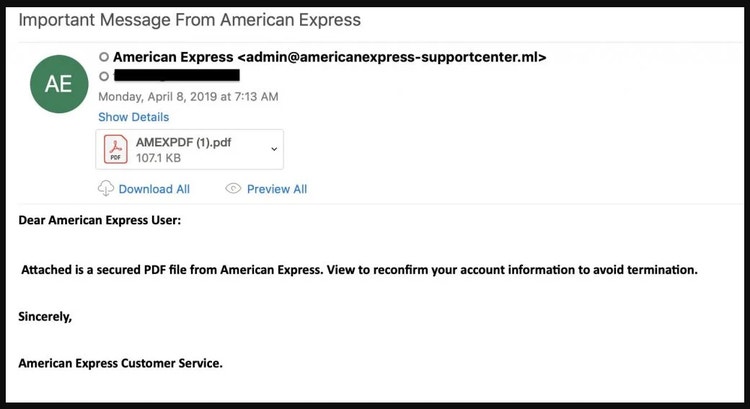
Examples of phishing leading to ransomware
Here are just a few of the thousands of organizations that experienced ransomware attacks via targeted phishing emails.
- A food and drink manufacturer—In this instance, cybercriminals discovered the name of the employee who handled invoices at an unnamed food and beverage manufacturer and used this information to trick that person into downloading a Microsoft Word document in a fake invoice email. The malware in the Word file enabled hackers to gain control of more than half of the business’s network before locking it down with ransomware.
- Langs Building Supplies—A ransomware gang learned enough about this Australian construction firm, including who it partnered with and its employees’ contact information, to get an employee to open a phishing email and trigger the installation of ransomware on its systems.
- University Hospital—In September 2020, an employee of the Newark, New Jersey, hospital fell for a phishing email and unwittingly gave hackers her network credentials. This triggered a ransomware attack that allowed hackers to view and encrypt roughly 48,000 documents containing patient names, Social Security numbers, dates of birth, driver’s license numbers, and other information. To decrypt their files and regain control of this sensitive information, the hospital paid a $670,000 ransom.
- Maastricht University (UM)—In October 2019, two university employees clicked on a link in a phishing email. This installed malware on the users’ workstations, which allowed attackers to access the entire UM network. After lurking in the university’s system to gather data, the hackers deployed ransomware that encrypted the data on 267 servers, including several critical systems, in just half an hour on December 23.
How to reduce your company’s vulnerabilities

The true cost of a ransomware attack is more than just the ransom. You also need to consider the price of operational downtime, device repairs, people hours, reputational damage, and lost opportunities that stem from this kind of attack. The best way to avoid these expenses is to minimize your company’s attack surface by limiting the amount of data available online about your employees.
Ideally, you’d want to lock down the digital privacy of your entire workforce. However, your employees’ data is by definition personal, which means that there are limits to what you can demand.
Has your personal information been exposed online?
With this in mind, you’ll have to decide how much you can realistically ask of your employees and whether factors like an employee’s seniority or level of authority will affect your decision-making process.
Regardless of where exactly you draw the line, the best path forward is to partner with your employees, empowering them to take control of their digital footprints by training your employees on what to watch out for, clarifying which privacy standards are expected for their roles, and giving them the tools needed to protect their privacy.
What a successful privacy protection plan looks like
The most useful privacy plans give you an accurate picture of your company’s threat landscape and the resources you’ll need to address your vulnerabilities.
Some of the key areas your plan should address are:
- What kinds of information pose the biggest threats?—This will help you prioritize which items to remove first.
- Which employees pose the biggest risks?—Is your C-suite your biggest liability? Or are lower-level employees putting your company at risk? To determine this, you might want to consult a privacy expert who is familiar with how bad actors weaponize personal data to target certain roles.
- How much time and effort can you realistically dedicate to privacy protection?—The process of safeguarding your team’s online privacy can be a huge undertaking, depending on how many individuals you need to cover, the level of depth, and the size of each person’s online presence. Moreover, it requires continuous, ongoing monitoring.
Key items to include in awareness and education training
Your employees can’t be proactive about their online privacy unless you equip them with the knowledge they need to do so.
The most important areas for any employee privacy training to cover include:
- The importance of locking down social media privacy settings—Cybercriminals can get an unnervingly clear picture of a person’s life just by looking at their social media activity. In fact, intimate details, like the fact that an executive is planning to attend an industry conference or coaches a soccer team, give bad actors the ammunition they need to manipulate your employees into downloading malware. For more information on locking down social media privacy, see our article, Top 5 social media privacy mistakes.
Has your personal information been exposed online?
- What not to share online—The biggest source of personal information about your employees is often the employees themselves. In fact, it’s easy to find examples of people sharing their daily routines, where their kids go to school, their vacation plans, their hobbies, and other data points that cybercriminals could use against them. See our article Why online privacy is vital to executive protection to learn more about what not to share on social media.
Which privacy tools to offer employees
You can make it easier for your employees to lock down their privacy by giving them the right tools.
Some of the most effective ones include:
- Web scans—Continuous web scans automate the process of searching the internet, social media, and the deep web to find which sites are publishing your employees’ information. This ensures that your employees know the full scope of their vulnerabilities.
- Personal data removal services—Hiring a company like ReputationDefender to perform the labor-intensive task of deleting your employees’ information from people-search sites and third-party websites will leave your employees free to focus on their core duties.
- Automated alerts—Providing your employees with notices of their personal information appearing will enable them to quickly act when any new (or previously deleted) instances of sensitive information crop up online.
As you can see, protecting your business from privacy risks is a complex process with lots of moving parts. The good news is that there are ways to make the process easier—and your employees will appreciate the added privacy protection they get in the process.
ReputationDefender’s ExecutivePrivacy was designed specifically to simplify the privacy protection process, providing robust protection to both businesses and employees with zero effort on the part of the person being covered.
If you’d like to learn more about our ExecutivePrivacy product—or if you just need advice regarding your company’s particular privacy issues—give us a call.
In the meantime, you can also learn about online privacy in these articles:
- 4 ways to keep corporate credentials off the dark web
- 6 best practices for digital executive protection
- The corporate security risks of being on LinkedIn
- It’s not personal: How people-search sites create threats for businesses
Need assistance? Talk to an expert.
All ReputationDefender consultations are free, confidential, and without obligation.
Call 877-492-5209 or Schedule a Consultation